Golf Cart/Electric Vehicle Registration
NEW Golf Cart Registration Renewal System for 2026
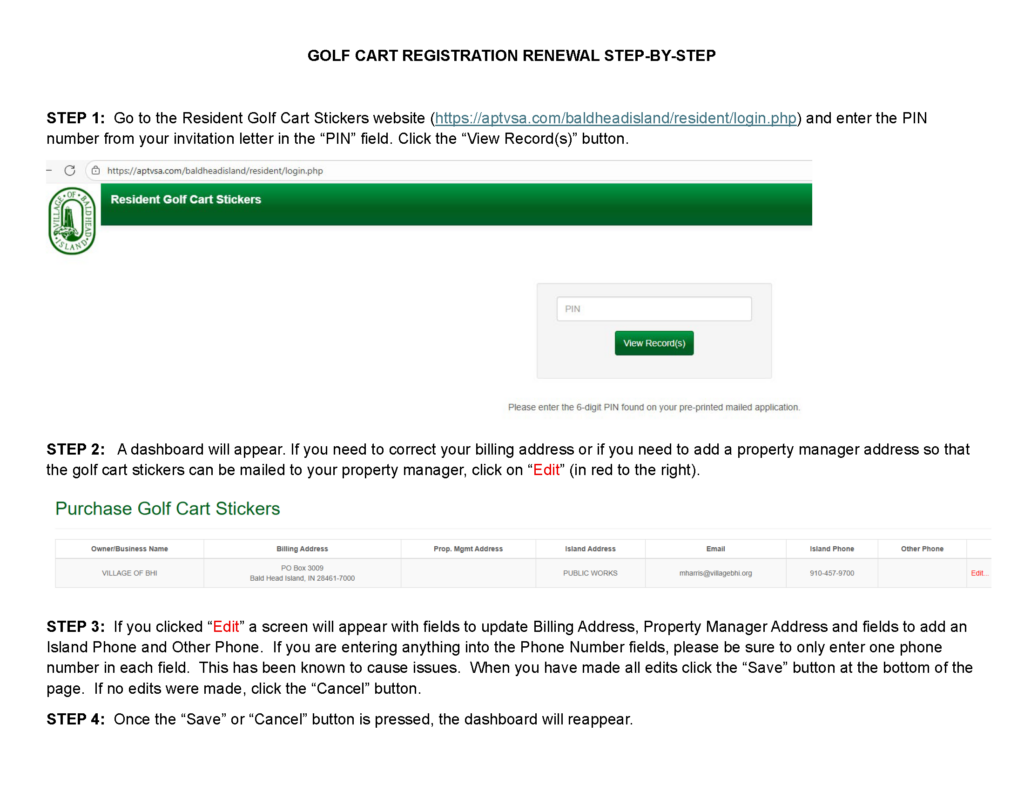
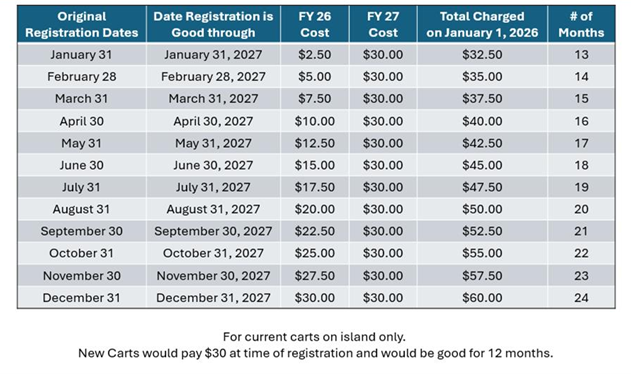
In December 2025, the Village transitioned to a new system for golf cart registration renewals. Current golf cart owners received a registration invitation letter with a PIN code to log in and renew the registration on their vehicles. Renewals are now based on the initial registration date, and cart owners were prorated for the 2026 fee and were charged the full fee for 2027 (a table specifying the prorated amounts can be found below in the FAQs). Due to this transition, enforcement of registrations was delayed to JULY 1, 2026. When the registration expires in future years, golf cart owners will receive a registration invitation letter to renew.
As of June 29, 2026, approximately 91 percent of existing carts had been renewed in the new system.
Online Golf Cart Registration
Below is some guidance for various scenarios for golf cart owners.
DELINQUENT REGISTRATIONS
If you are a golf cart owner who has a golf cart that had been previously registered with the Village, you should have renewed your registration for 2026 by now. If you have not renewed your cart registration(s) and do not have a PIN code, please email golfcart@villagebhi.org. You will need to provide the following information: Name, BHI Address, identifying information on a cart you own (Insurance/Serial Number/Make/Color).
Please allow up to three weeks for your stickers to arrive by mail. Your receipt from purchasing your registration will serve as your valid registration until your stickers arrive; please keep this in your cart. If you do not have this in your cart and are stopped by an officer, they will be able to pull up your registration in our system.
PAID BUT DON’T HAVE STICKER(S) YET
If you registered your cart(s) and have not received your stickers, your receipt from purchasing your registration will serve as your valid registration until your stickers arrive. Please keep this in your cart. If you do not have this in your cart and are stopped by an officer, they will be able to pull up your registration in our system. This is the same advice for cart owners who have reported that their stickers are lost (more info under LOST STICKERS below) and replacements have been ordered by Village staff.
NEW CART OWNER ON BHI – NEVER REGISTERED A CART BEFORE
If you are a golf cart owner who has never had a golf cart on the BHI before (brand new or purchased used/transferred from previous homeowner), your information is not in our system. You will need the Village to set up an online profile for you and issue a PIN code so you can register and pay for your new stickers. If you have a golf cart that has a sticker that has not expired, you STILL MUST register the cart under your name and, more importantly, your INSURANCE. If your cart is pulled over and your cart is not active in the system, you are subject to penalties including fines, towing & impoundment or removal (Ord. 28-51, view the schedule of penalties HERE).
If you need an online profile, please email golfcart@villagebhi.org. You will need to provide the following information: Name, BHI Address, identifying information on a cart you own (Insurance/Serial Number/Make/Color). Please attach the insurance coverage document to the email.
Please allow up to three weeks for your stickers to arrive by mail. Your receipt from purchasing your registration will serve as your valid registration until your stickers arrive; please keep this in your cart. If you do not have this in your cart and are stopped by an officer, they will be able to pull up your registration in our system.
NEW CART – PREVIOUS CART OWNER ON BHI
If you are a golf cart owner who has had a golf cart registered with the Village previously and you have a brand new golf cart or have purchased a used one, you may use your current PIN code to ADD the NEW/”NEW TO YOU” CART into the system and pay for the registration for your new stickers.
If you need your PIN code, please email golfcart@villagebhi.org. You will need to provide the following information: Name, BHI Address, identifying information on a cart you own (Insurance/Serial Number/Make/Color).
Please allow up to three weeks for your stickers to arrive by mail. Your receipt from purchasing your registration will serve as your valid registration until your stickers arrive; please keep this in your cart. If you do not have this in your cart and are stopped by an officer, they will be able to pull up your registration in our system.
GOLF CART INSPECTIONS ARE NO LONGER REQUIRED
With the implementation of the new registration system, which was aimed at efficiency and reducing staff time and resources allocated to the Village’s registration program, there will no longer be inspections of golf carts. Golf cart owners are responsible for abiding by the Village ordinances, and if a cart is out of compliance with vehicle equipment and specifications (Ord. 28-53), you are subject to penalties including fines, towing & impoundment, or removal (view the schedule of penalties HERE).
IMPORTANT – BILLING ADDRESS INFORMATION
It is important that you make sure your golf cart registration profile has your current billing address so that when your cart registration expires, you will receive your registration invitation for renewal. If you would rather have your property manager on the island apply the stickers to your carts for you, you can fill in the PROP. MGMT ADDRESS section of your golf cart profile. The mailing addresses for the BHI property management companies that will accept stickers on behalf of BHI property owners are listed at the bottom of this webpage.
PIN CODE/PROFILE UPDATES/SALE OR TRANSFER OF CARTS
Please retain your registration invitation letter(s) with your PIN CODES so you may make changes to your golf cart profile as necessary. This will enable you to update your mailing address, insurance information, and indicate when you have SOLD/TRANSFERRED OWNERSHIP (no longer own) your cart. Carts that are not road worthy/irreparable should be towed off-island. If you do not mark your vehicles as SOLD, you will receive a renewal invitation when your registration is about to expire. If you sell your cart to another person on BHI or if it is transferred to the new homeowner with the sale of your home, you MUST update your online profile or notify the Village that your cart has been SOLD. The Village wants all carts to be registered with up-to-date information on the owner and the insurance in case of an accident or theft.
In the case that you do not have your PIN code and you need to make an update to your profile, please email golfcart@villagebhi.org. You will need to provide the following information:
LOST STICKERS
If you registered your cart online and your stickers have not been received (we recommend giving it up to three weeks), please email golfcart@villagebhi.org. You will need to provide the following information: Name, BHI Address, identifying information on a cart you own (Insurance/Serial Number/Make/Color).
Currently, replacement stickers are mailed from the vendor to the Village Hall. There is no other option to pick up stickers on the island. All stickers will be mailed directly from the vendor, even new and “new to the island” carts (used carts delivered from the mainland that have never been registered on BHI) to the cart owner’s mailing address or designated property manager.
Frequently asked questions and answers are found below. Questions can be sent to golfcart@villagebhi.org.
As always, please email the Village directly with any questions or concerns. Posting questions on social media will not result in a response from Village staff. We will do our best to respond promptly between 8 a.m. and 5 p.m. Monday through Friday.
Questions & Answers
Q: I did not receive all the stickers I paid for, how do I get my missing stickers?
A: The Village is aware that there were a few cart owners who did not receive all the stickers that they were due to receive. If you were one of them, please email golfcart@villagebhi.org and let us know which sticker(s) are missing. Your receipt should include the cart numbers we need to follow up. (Added 1/16/2026)
Q: When I click the purchase button, it goes to a blank screen. What am I doing wrong?
A: Cart owners with an apostrophe (‘) in their name, for example, O’Connor, were not able to proceed to the payment site. The Village has updated the database to avoid this issue. Staff will be reaching out to cart owners who contacted us about this problem. (Added 1/16/2026)
Q: There is incorrect information about the carts listed in the system. How do I change that?
A: You can now edit this information by clicking “Edit” next to the cart that needs to be updated/corrected. This includes updating insurance. (Added 1/6/2026)
Q: I never received the invitation letter with the PIN. How do I get my PIN and make sure my billing address is updated?
A: Village Staff will need to send you the PIN. Please email golfcart@villagebhi.org and include the following information: Name, BHI Address, identifying information on a cart you own (Insurance/Serial Number/Make/Color. (Added 1/6/2026).
Q: When I logged in, corrected my mailing address, and went to pay, it went to a blank screen. Why am I unable to pay?
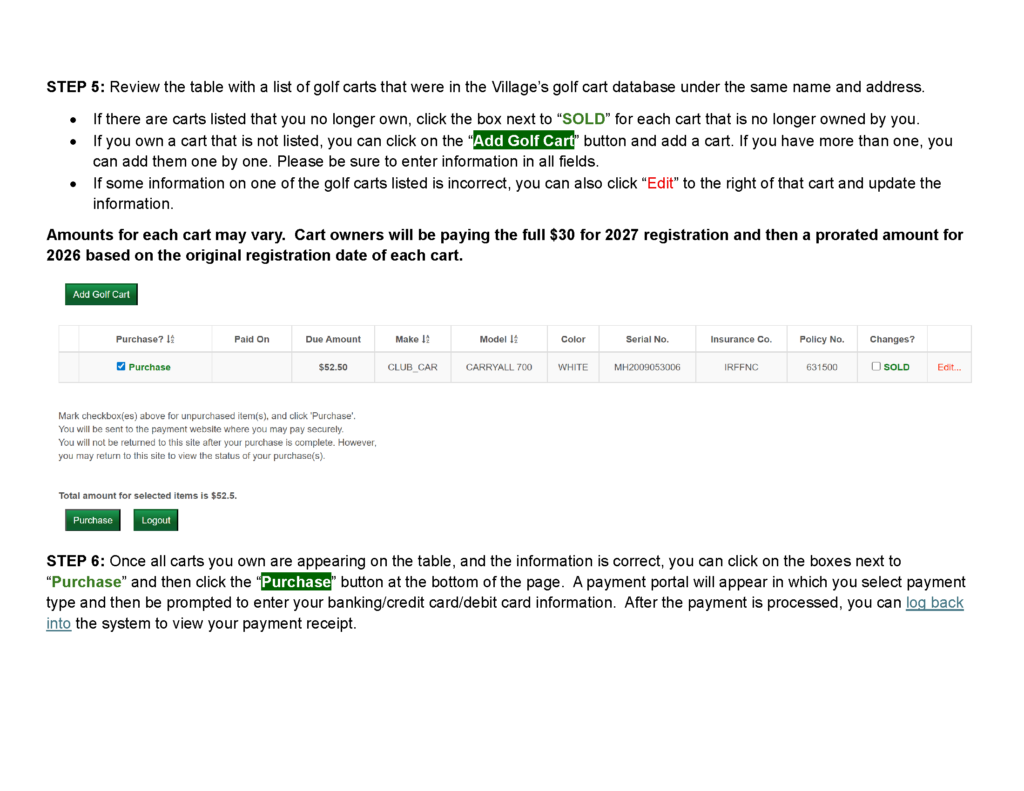
A: In some cases, the system will not process the payment if there were multiple phone numbers entered in the phone number fields, or if other fields were left blank in the new cart entry. (Added 1/6/2026)
Q: When I type in the link in the letter, it does not go to a webpage that has a place to enter a pin.
A: This is the correct link to the application site: https://aptvsa.com/baldheadisland/resident/login.php
You should be able to click on this link and be directed to a webpage that reads “Resident Golf Cart Stickers” in the top left corner, followed by a box in the center of the page for entering the PIN from your invitation letter. Some folks were misspelling the link (e.g., entering aptvisa when there isn’t an “i” or were entering the link into the search bar instead of the address bar in their browser). (Added 12/16/2025 – 9:26 a.m.)
Q: When I received my invitation letter, it looked like I was getting charged too much and for two different amounts for each of my carts. Why?
A: The explanation letter that came with your invitation indicates that cart owners will be paying to renew their carts through 2027. 2026 is prorated based on the original registration date of each cart. So, you are getting charged the full $30 for both carts for 2027 and then a prorated amount for each cart based on when they were originally registered. If your carts were registered at different times, the amounts will differ. (Added 12/16/2025 – 9:45 a.m.)
See the table below from the explanation letter (Added 1/7/2026).
Q: We received an invitation letter that includes carts we no longer own. What should we do?
A: In the golf cart sticker system, you can select “SOLD” next to any golf carts listed that you do not currently own. (Updated 1/6/2026)
Q: We received an invitation letter that includes one cart and not the other. What should we do?
A: In the golf cart sticker system, you can click “Add Golf Cart” to add carts that are not listed. (Updated 1/6/2026)
Q: : We received an invitation letter that includes duplicate carts. What should we do?
A: In the golf cart sticker system, you should only select one cart for purchase so that you are not charged twice. (Updated 1/6/2026)
Q: We received an invitation letter that includes carts we no longer own, but we have two new replacement carts that are not in the system. What should we do?
A: In the golf cart sticker system, you can select “SOLD” for the carts you no longer own. Then you can click “Add Golf Cart” to add each cart one at a time, then select “Purchase” next to the carts you entered. (Updated 1/6/2026)
Q: We have multiple golf carts (fleet) registered for our company. Is there a separate process for us?
A: Your company should have received invitation letters for your registered carts. There may be several pins associated with your company, but those pins will bring up a table with several carts, which will allow the company to pay for several carts at once. (Added 1/6/2026)
Q: Can I have my stickers sent to my property manager?
A: Yes, when you log in to the system, you can click “Edit” on the dashboard and add your property manager’s information into the system so that the stickers are mailed to them.
A fulfillment letter will be included with the stickers when they are mailed to the specified address. The letter will include a list of all the carts by year, make, model, color, sticker numbers, and owner name so the property manager can match the stickers with the correct carts. (Updated 1/6/2026)
Below is a list of property managers who will accept golf cart stickers on behalf of their property owners.
PLEASE MAKE SURE YOU HAVE YOUR STICKERS SENT TO YOUR CURRENT PROPERTY MANAGER – FOLKS ARE SENDING STICKERS TO THE WRONG COMPANY.
BHI Rentals & Sales would like all their owners to have the stickers mailed to them, and prefers this so they can ensure the stickers are placed on the carts. Here is the correct mailing info:
BHI Rentals & Sales
PO Box 3059
Bald Head Island, NC 28461
Bald Head Island Services is now Munroe Properties. Please use the mailing information for Munroe Properties (shown below).
BHI Vacations will accept stickers on behalf of property owners. Here is the correct mailing info:
Bald Head Island Vacations
PO Box 3544
Bald Head Island, NC 28461
Intracoastal will accept stickers on behalf of property owners. Here is the correct mailing info:
Intracoastal Vacation Rentals
PO Box 3490
Bald Head Island, NC 28461
iTrip will accept stickers on behalf of property owners. Here is the correct mailing info:
Elisa Roels
iTrip NC Beaches
PO Box 3520
Bald Head Island, NC 28461
Munroe Properties will accept stickers on behalf of property owners. Here is the correct mailing info:
Munroe Properties
PO Box 3322
Bald Head Island, NC 28461
Tiffany’s Beach Properties will accept stickers on behalf of property owners. Here is the correct mailing info:
Tiffany’s Beach Properties
PO Box 3001
Bald Head Island, NC 28461
Wendy Wilmot Properties is now Munroe Properties. Please use the mailing information for Munroe Properties (shown above).